
Why Does Your Computer Get Slower Over Time? (And What You Can Actually Do About It)

If you’ve ever caught yourself making a cup of tea while waiting for your computer to boot up, you’re not alone — it’s one of the most common things people mention to me, usually said with a bit of a sigh, like it’s just something they’ve learned to live with.
Here’s the good news: a slow computer isn’t usually a sign that it’s dying. More often than not, it’s a handful of very fixable things quietly piling up — and most of the fixes don’t cost a cent.
Why Computers Actually Slow Down
Before jumping to “I guess I need a new one,” it’s worth understanding what’s really going on. In my experience, slow computers almost always come down to one (or a combination) of four things.
1. Too many programs trying to start at once
Every time you install something new, there’s a good chance it quietly adds itself to your list of “startup programs” — the things that automatically open the moment you turn your computer on. Over a few years, this list grows without you ever really noticing, until one day your computer is trying to load fifteen different programs before you’ve even opened a web browser.
2. A hard drive that’s nearly full
Computers (much like people, honestly) don’t perform well when they’re completely out of breathing room. Once your storage gets up around 80-90% full, everything slows down — saving files, opening programs, even just general day-to-day use.
3. Ageing hardware
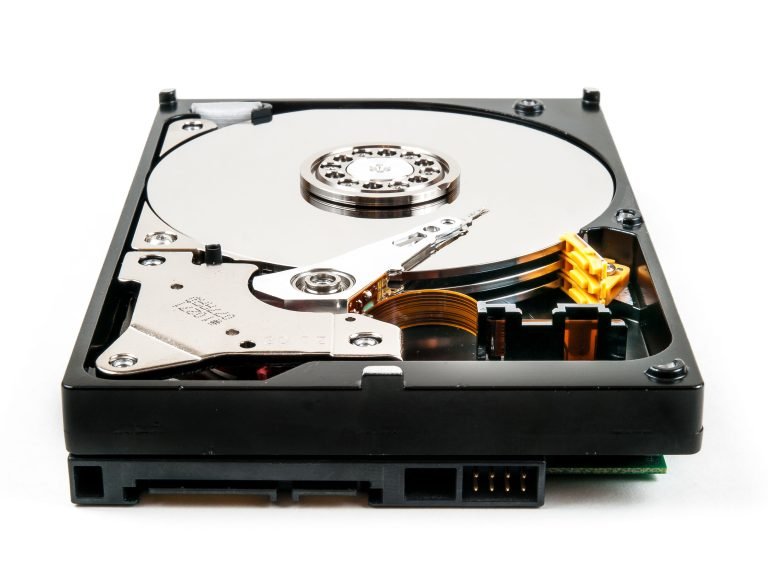
This one’s a bit more literal — older computers, especially ones still running a traditional hard drive (the kind with a spinning disc inside, a bit like a tiny record player), are simply working harder than modern hardware needs to. More on this below, because it’s actually one of the easiest and most dramatic fixes available.
4. Something you can’t see
Occasionally, a slow computer is a sign of something less obvious running in the background — not always something sinister, but worth ruling out with a proper scan.
The Free Fixes (Seriously, Free)
Here’s where the good news really kicks in. Three of the four causes above can usually be fixed without spending a dollar:
- Review your startup programs. On Windows, press Ctrl+Shift+Esc to open Task Manager, click the “Startup” tab, and you’ll see everything set to launch automatically. Right-click anything you don’t actually need running the moment you turn your computer on, and select “Disable.”
- Free up some space. Empty your Recycle Bin, clear out your Downloads folder (that’s usually where years of forgotten files pile up), and run Windows’ built-in Disk Cleanup tool.
- Run your updates. Head to Settings → Windows Update, and make sure everything is current. Updates often include performance improvements, not just security patches.
- Run a quick scan. Open Windows Security (Windows Defender) and let it do a full scan, just to rule out anything running quietly in the background that shouldn’t be.
Honestly, doing just these four things can make an old, sluggish computer feel noticeably better — and it costs nothing but a bit of time.
The “Bubblegum Stick” That Changes Everything
If you’ve done all of the above and your computer is still dragging its feet, there’s one more thing worth knowing about — and it’s genuinely one of my favourite upgrades to install, because the difference is so immediate.
It’s called an NVMe drive, but I usually just call it the “bubblegum stick,” because that’s roughly the size of the thing — a small stick of storage, not much bigger than a piece of chewing gum, that replaces an old spinning hard drive entirely.
The difference isn’t subtle. A computer running on an old hard drive is a bit like a car running on an engine that’s constantly working overtime. Swap that out for an NVMe drive, and suddenly everything — starting up, opening programs, saving files — happens close to instantly. For a lot of people, it genuinely feels like getting a brand new computer, at a fraction of the cost of actually buying one.
When It’s Actually Time for a New Computer
To be fair, there are times when a computer really has reached the end of its useful life — and I’ll always tell you honestly if that’s the case, rather than recommending an upgrade just for the sake of it. Generally, if a computer is more than 7-8 years old, struggling to run modern software no matter what you do, or the cost of fixing it starts creeping close to the cost of a new one, that’s usually the point where replacing it makes more sense than repairing it.
But that’s the exception, not the rule. More often than not, a slow computer just needs a bit of care — not a funeral.
Still not sure?
That’s exactly what Craig the Computer Geek is here for. If a call felt off, give Craig a ring and describe what happened. He’ll help figure it out — no judgement, and no charge just for asking. For more on protecting against scams, check Craig’s guide on how to spot a scam email too.
Got a call that made you suspicious? Send Craig the details — it helps warn others in Canberra too.
Your business has enough things to worry about. Your IT shouldn’t be one of them.
Craig can help you understand what you’re working with, what needs attention, and what can wait.
Give Craig the Computer Geek a call 📞, or send a Message on Facebook
0411 147 909 | Monday–Friday | 9:00 am–5:30 pm
Craig the Computer Geek — helping small businesses across Canberra and Queanbeyan since 2012.
Have a question? Get in touch or share this article with another small-business owner who might find it useful.
Share this